오늘 마주친 두번째 error.
분명히 Ctrl + Alt + Up / Down이 Eclipse에서 한 줄 복사하는 단축키라고 하는데,
화면이 뒤집힌다...... 당황;;;
이건 Intel 그래픽 카드를 쓸 경우에 흔히 나타나는 증상이라고 하는데 해결하려면
바탕화면에서 마우스 오른쪽 클릭 -> 바로 가기 키 -> 사용 안 함을 눌러주면 된다!
또는 바탕화면에서 마우스 오른쪽 클릭 -> 그래픽 속성 -> 옵션 및 지원 -> 바로 가기 키 관리 -> 사용 안 함을
눌러준다.
이렇게 해도 안되면 바로 가기 키 관리 -> 사용을 누른 후 다른 바로가기 키를 임의로 넣어주자!
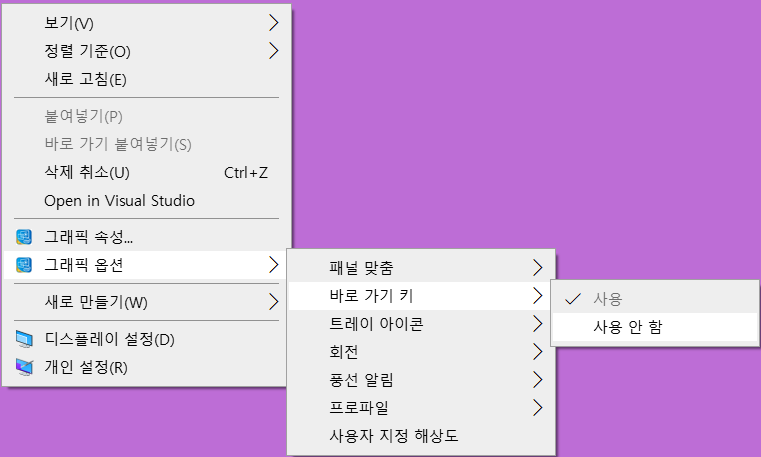
If Ctrl + Alt + Up / Down key is not working in Eclipse, there are two ways to solve the problem.
Right click on Desktop ->Graphics option -> Hot Keys -> Disable
Right click on Desktop -> Graphics property -> Options and Support -> Select "Manage Hot Keys Disable"
'Eclipse > error' 카테고리의 다른 글
| How to rename a class (0) | 2021.03.02 |
|---|---|
| Launch configuration Main (1) references non-existing project Tutorial 2 (1) | 2021.03.02 |