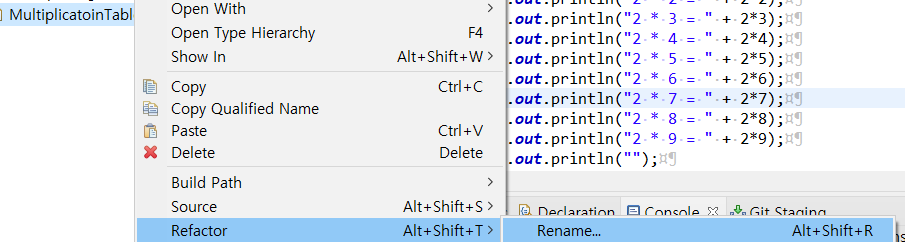
오늘은 class name을 바꿀 일이 생겼는데, eclipse에서 어떻게 바꿔야할지 몰라서 googling 했네요
class 이름 오른쪽 마우스 클릭 -> Refactor -> Rename을 하면 됩니당
또는 단축키가 있는데 Alt + Shift + R을 누르면 되용!
아니면, 클래스 이름을 클릭한 뒤 F2를 눌러도 됩니당:)
There are three ways to rename a class:
1. Right click on the class in the project explorer
2. Select Refactor
3. Select Rename
Click on the class and press F2!
Shortcut keys: Alt + Shift + R
'Eclipse > error' 카테고리의 다른 글
| If Ctrl + Alt + Up / Down key is not working... (0) | 2021.03.02 |
|---|---|
| Launch configuration Main (1) references non-existing project Tutorial 2 (1) | 2021.03.02 |